Description:
Updates MaxMind GeoIp2 database.
This add-on will automatically download the GeoIp2 database to your server every day so you will always have the latest version.
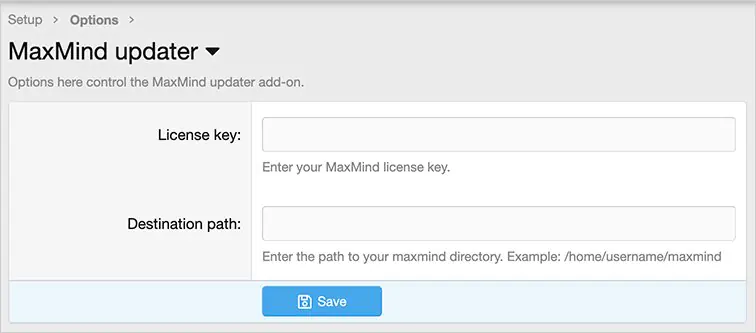
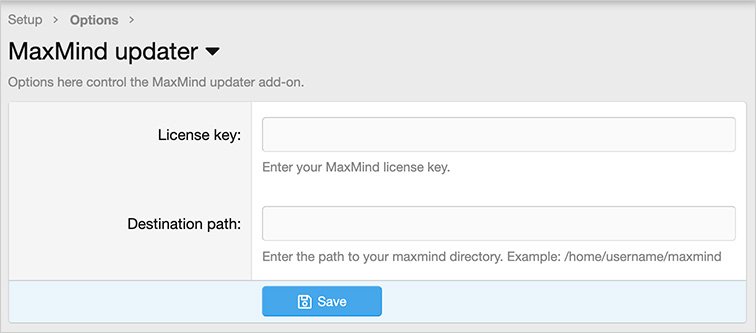
(Example of Options page)
Setup step 1:
Follow the instructions from this link to get your Maxmind license key:
https://codanya.com/blog/articles/how-to-get-your-maxmind-license-key
Setup step 2:
Go to the options page and enter your License key and Destination path.
Setup step 3:
This add-on requires the Archive_Tar PHP extension. Most servers already have this installed, but if yours does not, follow the instructions here:
Setup step 4:
You can run the Cron entry for the first time manually to download the database.
Questions and answers:
Q: Do I have to create the /home/username/maxmind directory?
A: No. The directory will be created for you the first time you run the cron entry.
Q: What time does the Cron entry run?
A: At midnight every day UTC time.
Q: I'm on XenForo Cloud, what Destination path should I use?
A: Enter the following: internal_data/local/maxmind
Published:
January 26, 2026 11:52 AM
Version:
Category:
Is Nulling Required:
NOXenforo Compatibility:
versions: 2.3Tags: